Every guide on how to stay organized in college tells you the same thing: put every due date from every class into one master list, and check it daily. That advice is correct, and almost nobody manages it — not because students lack discipline, but because the master list is the second place the information has to be typed.
The first place is your inbox. The syllabus arrived by email. The moved office hours arrived by email. "Lab report 3 is due Friday at 11:59pm" arrived buried in paragraph four of an email about something else. Every college organization app — Notion, Todoist, MyStudyLife, a paper planner — asks you to read that email and then retype it somewhere else.
This is about skipping the retyping.
Your Professors Are Already Contact Records
A professor emails you from one fixed address, all semester, about one subject. That is precisely the shape of a CRM contact: one person, one running history, everything they have told you attached to their name.
Sales teams have used this shape for thirty years to keep track of hundreds of relationships. A semester is five professors, a few TAs and an advisor. The tool is heavier duty than the problem needs, which is exactly why it works.
The mapping is direct:
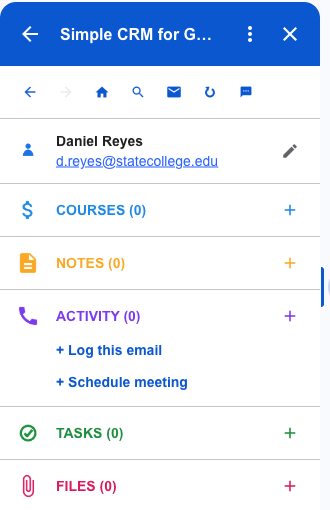
- Contact — the professor, TA, advisor, or group partner
- Course — BIO 214, and everything attached to it
- Note — office hours, exam scope, how they want work submitted
- Task — an assignment with a due date
- Activity — the email itself, kept on the record
- File — the syllabus, the study guide, the rubric
Saving a Professor Takes One Click
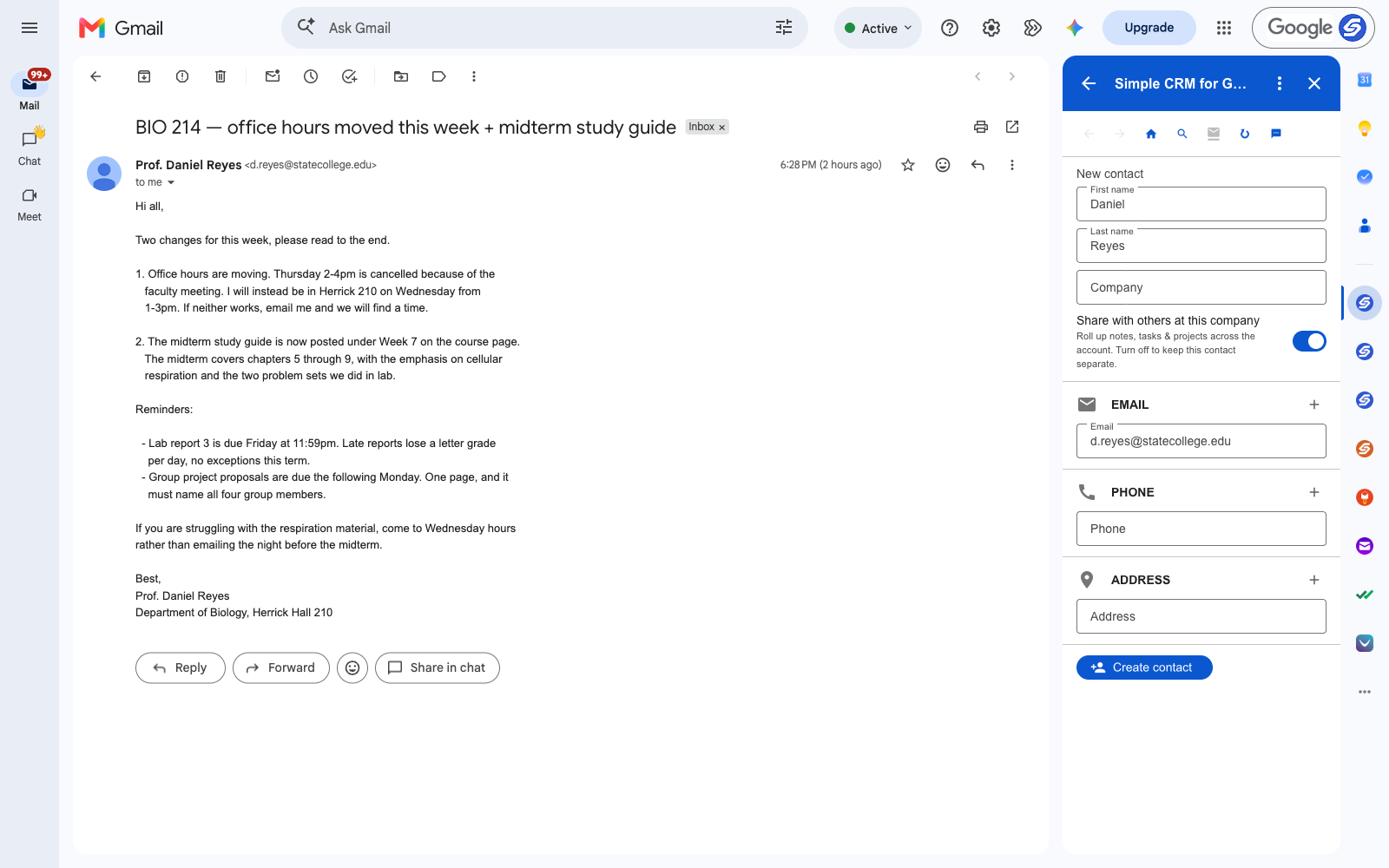
Open the email. Simple CRM for Gmail sits in the sidebar, reads the sender, and fills in the name and address before you have done anything. Press Create contact and it saves into your own Google Contacts.
One detail worth changing on day one: in settings you can rename Deals to Courses. The product is built for sales, the vocabulary is adjustable, and "Courses" is the version that will make sense to you in week nine.
How to Keep Track of Assignments Without a Second App
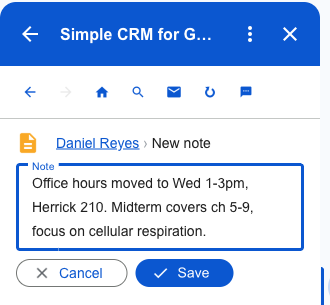
Take a real email. Office hours move from Thursday 2–4 to Wednesday 1–3 in Herrick 210. The midterm covers chapters five through nine. Lab report 3 is due Friday at 11:59pm, losing a letter grade per day after that.
That is three separate things you will need later, arriving in one message you will read once. Written against the professor, they stop being something you have to search for.
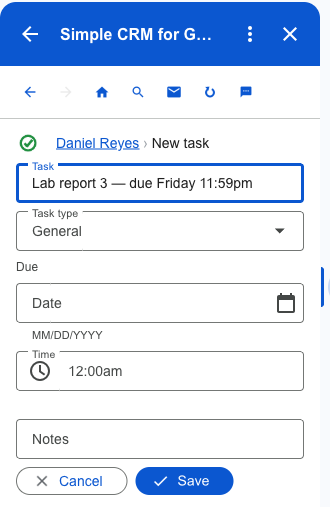
The deadline becomes a task. Because tasks are written to Google Tasks, it then appears in the Gmail sidebar, in Google Calendar, and on your phone — beside everything else you already track, rather than in yet another app you have to remember to open.
The Syllabus Stops Getting Lost
Every course has three or four documents you need all term and can never find in March: the syllabus, the study guide, the rubric, the reading list.
You can attach files to a record two ways. Pick a file from Google Drive, or attach one straight off the email you are reading. Either way nothing is copied — the record stores a link to the file in your Drive, so there is one version, it stays where it already lives, and updating it updates it everywhere.
That matters more than it sounds. The reason the syllabus goes missing is that it exists in four places — the course page, an email attachment, your Downloads folder and a screenshot — and none of them is the one you remember.
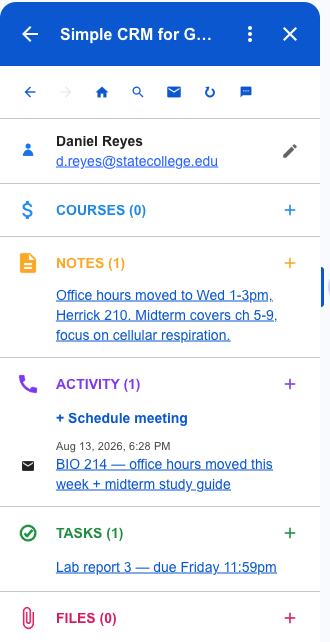
What One Course Looks Like After Five Minutes
Next time that professor emails, all of it is on screen before you have finished reading the first line. Do it for five courses and you have replaced the thing you were actually doing, which was re-reading old email and hoping.
$49 Once, for Six Years
There is a student plan: $49 one time, for any .edu address, covering six years. Not a subscription — one payment, no renewal, nothing to cancel.
Six years is deliberate. It is the window the US Department of Education itself measures undergraduate completion over — 150% of a four-year degree — so it covers a changed major, a co-op, or a year out, without pretending everyone finishes in eight semesters. If you are a sophomore now, it runs past graduation.
For comparison, the standard plan is $15 a month. Four years of that is $720.
One Thing to Decide Before You Start
Most universities close or wipe alumni accounts some time after graduation. Anything living only in a school inbox goes with it.
Simple CRM stores nothing on our servers. Contacts go to Google Contacts, courses and notes to Google Sheets in your Drive, tasks to Google Tasks, files stay in Drive. It is your data, in your account, in ordinary formats.
So be deliberate about which account you install it on. If you live in your .edu address, use it — but export the Drive folder before your access ends and you keep everything. Four years of advisors, recommendation-letter threads and project notes are worth considerably more after graduation than during it.
Getting Started
Install it from the Google Workspace Marketplace, open any email from a professor, and press Create contact. There is no setup, no import, and no empty database waiting to be filled — it opens already holding the Google Contacts you have.
Free for fourteen days, no card. Then $49 once with a .edu address, or $15 a month without one.
This is one of several walkthroughs. The idea behind all of them is in why a CRM should live in your inbox — there are also versions for freelancers, consultants and contractors.